Your Rebalancing Plan Won't Tell You to Sell a 1% Holding Anymore
 Dennis Vymer
One email this week had a screenshot I didn't enjoy looking at. A holding the reader had planned at 1% of her portfolio read "1% / 0%", then "€3,000 over", and then the app told her to sell all of it.
She never asked for that. She had added a new fund to her plan, and the app made room for it by shrinking every other target and rounding them to whole percents. Her 1% became 0%. And 0% is how the app reads "I want out of this one".
Nearly everything I shipped this week started like that: with an email from someone using MFFT. So this one is a week of your fixes.
Your plan keeps your small holdings
The Balance tab on the portfolio page compares what you own with the mix you want, and tells you what to buy with your next deposit. It works well right until a small slice gets rounded into a sell order.
Now:
- Targets take decimals. Type "1.5" or "0,5" and that's what you get. (Before, "1.5" could quietly turn into 15. Sorry.)
- A holding you own never rounds down to zero when the plan makes room for something new.
- A ticker you already own joins the plan at its current share, not at 0%.
- Before you save, a line names any holding you own that the plan has at 0%, so a sell is always your decision.
- Every row reads "Now 8.5% / Target 8%", so you see both numbers instead of guessing which is which.
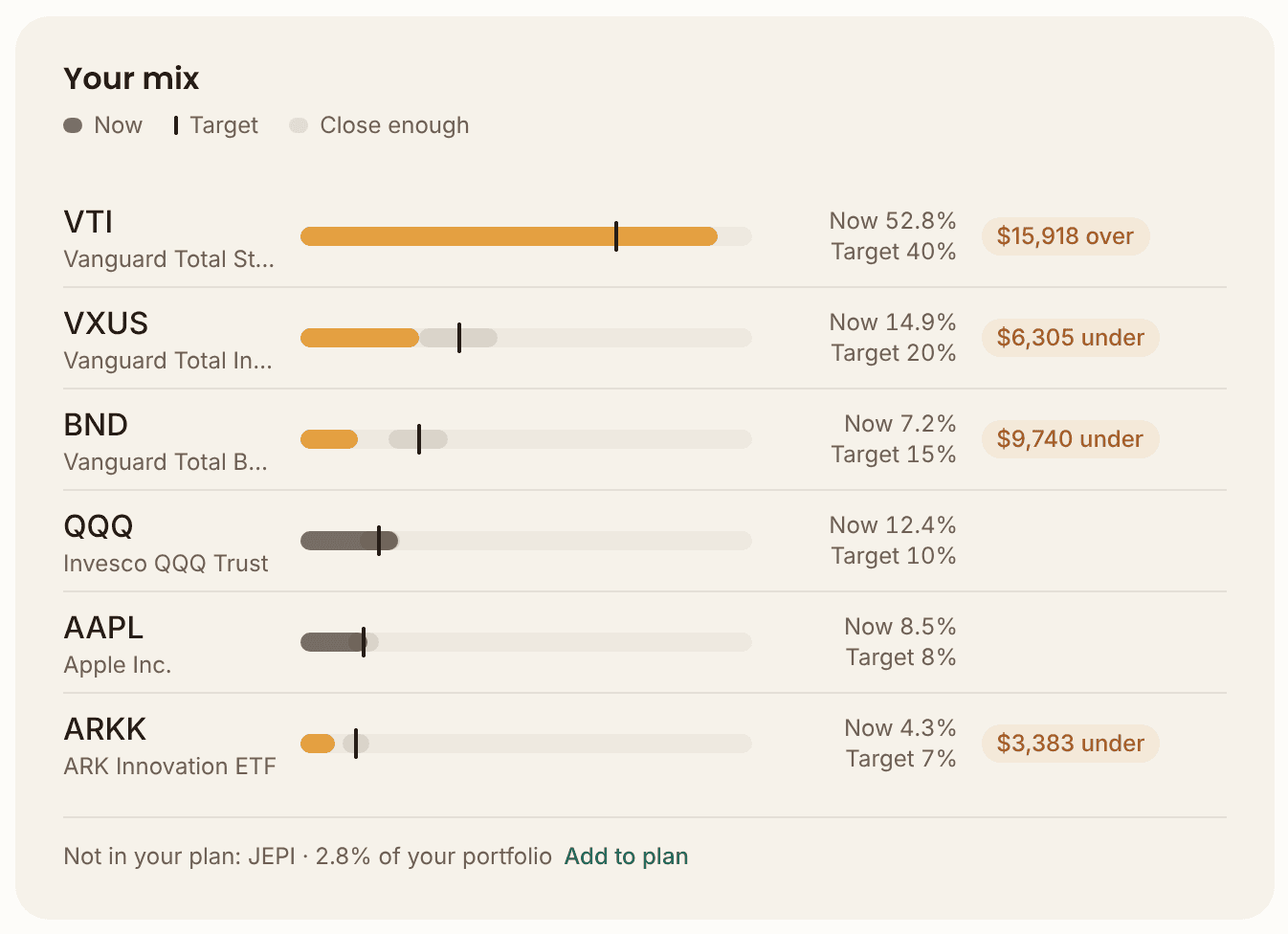
Portfolio, then Balance, then Edit plan. Or poke at the sample family's plan in the demo without an account.
Profit & taxes now shows the purchases it set aside
Another reader filled in every purchase date for his holdings, which is boring work, and got "Missing data" on all of them as a thank you.
The data wasn't missing. On a few holdings his recorded purchases added up to more shares than he holds today. When that happens, MFFT leaves the oldest extra purchases out of the gain, which is the right call, but it never showed you which ones. "Review" sent you to a list where everything looked fine. A loop with nothing to find.
Now the purchase drawer has a "Not counted" group with exactly those purchases. Each one can be edited, deleted, or closed with "Record a sale", already filled in with the surplus. And if a new purchase would push you past what you hold, the form warns you before you save.
One more thing from the same inbox: if you only know your average price per share, that's fine. The purchase form now says so, and suggests dating it at your latest purchase so the app never makes your holding period look longer than it is.
Smaller things you'll notice
- Your home no longer pays you rent. The cashflow chart in Your Financial Future estimates rent at 3% of a property's value a year when you haven't entered real rent. It did that for the flat you live in too, so your plan counted income that doesn't exist. Tick "Primary residence" on your home under Properties and the estimate goes away. Any estimate is now labelled "estimated at 3%", so you can spot it.
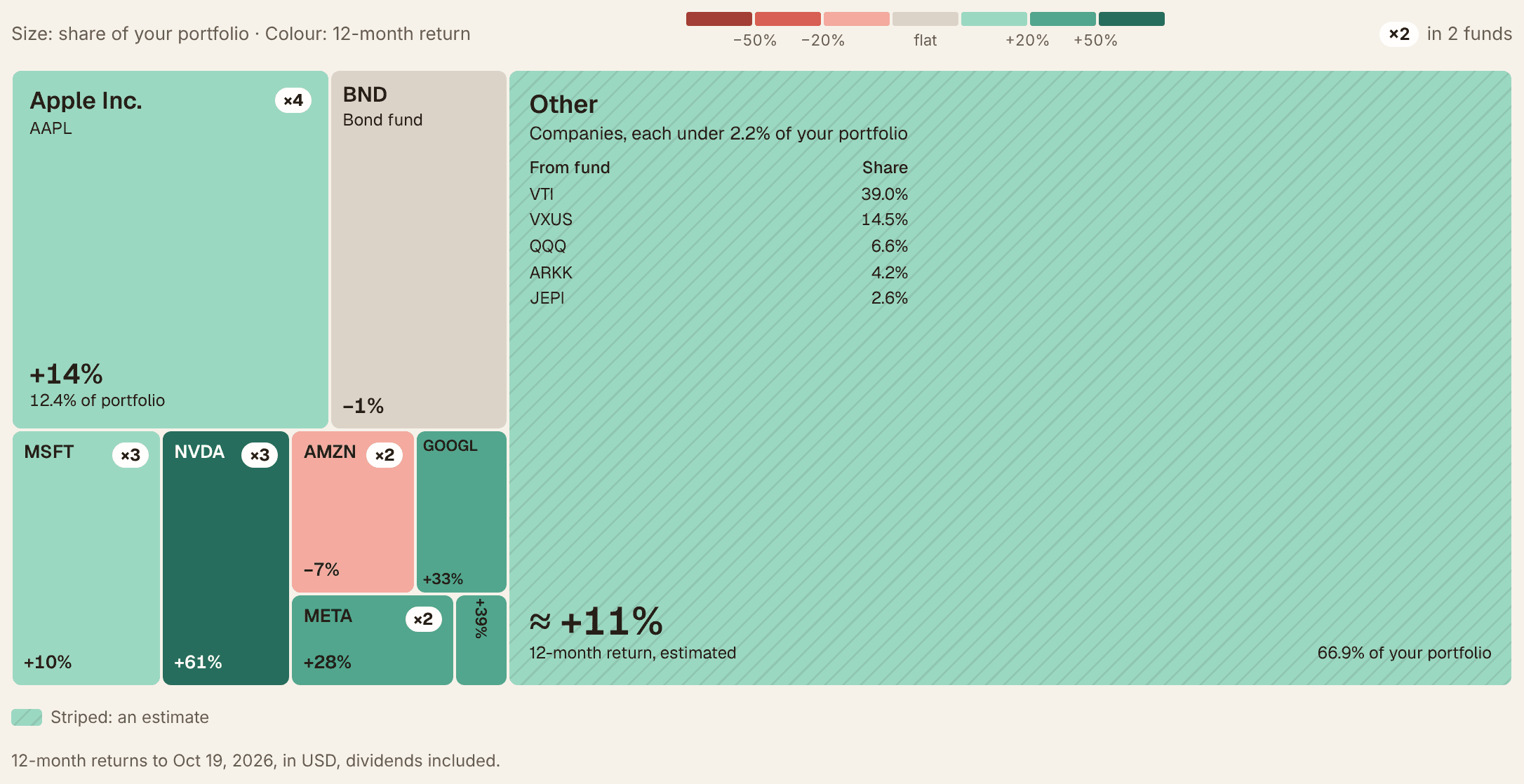
- The heat map counts your doubles. Last week's holdings heat map now puts a small "×2" or "×4" on a company that sits in more than one of your funds. In the demo, Apple carries ×4. That's the kind of overlap you'd never notice from fund names.
- Every holding shows its value. Rows on the portfolio page now show what each position is worth, like "$65,604", instead of a share price you'd have to multiply in your head.
- Ugandan shillings. Someone asked, so MFFT now speaks 26 currencies.
- The net worth menu says what it does. It showed a ticked "Include in net worth" box, so to exclude an account you had to click "Include". Now it says "Exclude from net worth".
What's next
Last week I said living off your investments was next. Your emails jumped the queue, and I'd make that trade again. It's still at the top of my list, together with going through portfolio imports again with real broker files. And MFFT on Android is in the works.
The lesson
The shilling taught me one. The usual exchange rate source I use doesn't quote it, so it had exactly one source behind it. If that one source had been down on the wrong night, a shilling balance would have been saved at a rate of one to one, about 4,000 times too high, into your net worth history for good. So rarer currencies now have a second, independent source as a backup. A currency isn't supported because it's in a dropdown. It's supported when it can't quietly lie to you.
Keep the emails coming. This week proved they're the best roadmap I have.
Stay updated
Get notified when we publish new articles.
Ready to apply this?
Start tracking your finances today and put these tips into practice.
- Import bank statements in seconds
- AI-powered categorization
- Beautiful visualizations
- Set and track financial goals
Free Financial Tools
Related posts

Your Dashboard Now Answers One Question: How Am I Doing?
The old dashboard is gone. The new home page sums up your net worth, last month and the road to your goals on one screen, showing only what you actually track. Plus the promised holdings heat map and a categorising prompt that stopped nagging.

Your Budget Now Shows the Whole Year. The Old Page Is Gone.
The budget page now shows your whole year on one chart, spreads yearly bills across the months they cover and handles foreign currency properly. Net worth got a growth chart with a milestone line, and the portfolio finally counts every holding.

Your Funds Don't Tell You What You Own. Now Your Net Worth Page Does.
Your net worth page has a new tile that looks through your funds and pensions and tells you which regions, sectors and currencies your money is actually riding on, crypto got a Profit & taxes tab with an exchange-export import, and the free calculators now lead with the answer instead of hiding it.