Connect your AI assistant to your finances
Link Claude, ChatGPT or any MCP client to your account and just ask. It reads your budget, net worth and plan — and updates them for you when you allow it.
The questions you actually have
Stop clicking through screens — just ask in plain words. Your assistant answers from your real numbers, and makes the change for you when you allow it. For example:
“Look at my June spending in MFFT and suggest categories.”
“Add a new car, 500k, in about 2 years to my MFFT plan.”
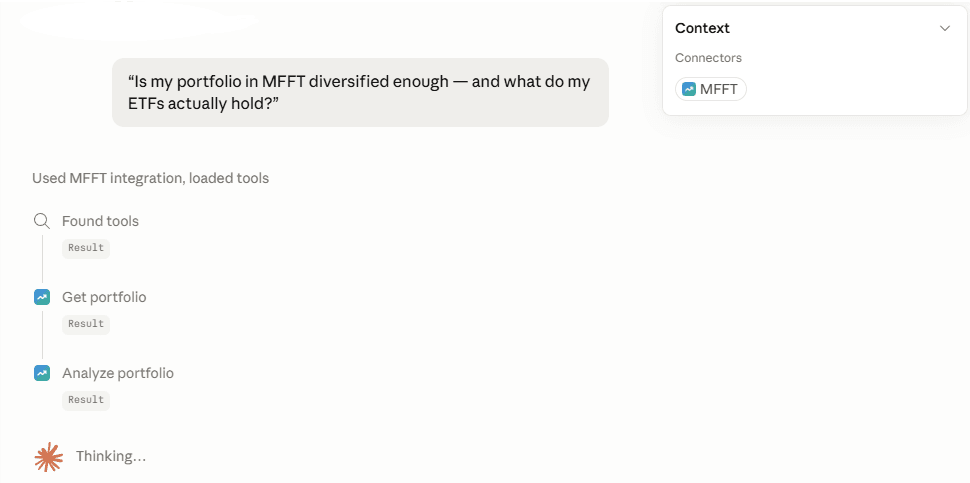
“Is my portfolio in MFFT diversified enough — and what do my ETFs actually hold?”
You stay in control
You decide what a client can do — and you can remove it whenever you want.
You approve everything
Nothing connects on its own. You sign in on our page (the AI never sees your password) and choose read-only or read-and-write. Every change asks you first.
Remove it anytime — your call
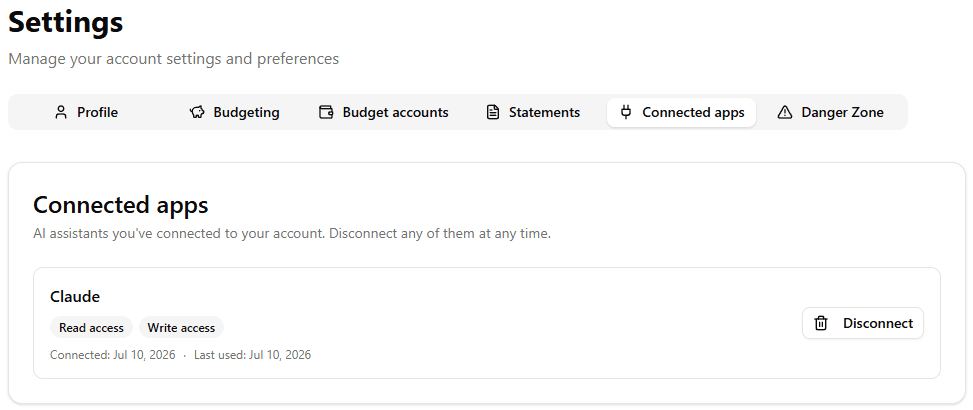
Revoke any connected client in one click from Settings → Connected apps. It stops working immediately.
Where your data goes
What you ask for is sent to that client’s provider — Anthropic for Claude, OpenAI for ChatGPT — under your own account. Only connect clients you trust.
How the connector works
A secure bridge between your AI client and your account. Connect once, sign in, and choose what the assistant may do. It uses the open Model Context Protocol (MCP) — no browser extensions, no copy-pasting.
Works with Claude, ChatGPT (Developer mode), Claude Code, Cursor and other MCP clients.
Connect Claude
Custom connectors work on every Claude plan; the Free plan allows one connector.
- 1
In Claude, open Settings → Connectors.
- 2
Choose “Add custom connector.”
- 3
Paste the connector URL below and confirm.
- 4
Claude opens a secure sign-in page on My Financial Freedom Tracker. Sign in, review the access you’re granting, and approve.
Connector URL
https://api.myfinancialfreedomtracker.com/mcp/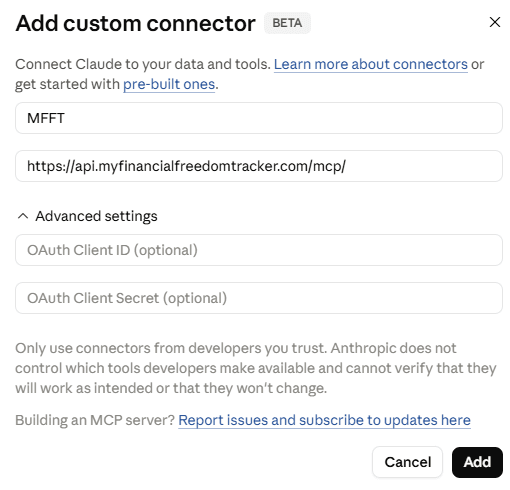
Connect ChatGPT
Developer mode is available on paid ChatGPT plans (Plus, Pro, Business, Enterprise and Edu).
- 1
In ChatGPT, open Settings → Apps & Connectors → Advanced and turn on Developer mode.
- 2
Return to Apps & Connectors and choose “Create” (or “Add”) to make a new connector.
- 3
Give it a name, paste the connector URL below, and create it.
- 4
Approve the secure sign-in and access request when ChatGPT opens it.
Connector URL
https://api.myfinancialfreedomtracker.com/mcp/Without Developer mode, ChatGPT can only search and read your data. Adding transactions or updating your plan needs Developer mode — until My Financial Freedom Tracker is listed in the ChatGPT app directory.
Questions people ask before connecting
- Can the AI move my money?
- No. There is no payment capability in the connector at all — it cannot make a transfer, pay a bill, or touch a real bank account. It reads and edits the records inside your account here, nothing else. It also cannot delete your account, change your password or email, or delete categories: account management is never exposed.
- What can the AI actually see?
- With read access: your transactions and categories, budgets and auto-categorisation rules, net-worth accounts and balances (including personal debts and time deposits), investment holdings and portfolio analysis, individual bonds, crypto, precious metals, pension and investment funds, insurance policies, properties and mortgages, your recorded purchase history and the capital-gains tax estimates built from it, and your FIRE plan and its settings. If you also grant write access it can add, correct and delete transactions, import statement rows you provide, manage categories and rules, record balances and valuations, add accounts, properties and holdings, record purchases for profit-and-loss tracking, and update your plan. It can never delete your account, change your password or email, take a payment, change your subscription, or change your display currency. You choose read-only or read-and-write when you approve the connection.
- What does Anthropic or OpenAI receive?
- Whatever your AI client requests is transmitted to the provider of the client you chose — Anthropic for Claude, OpenAI for ChatGPT — under your own account with them and their terms and privacy policy. We do not choose that provider for you and we do not control how they process it, so only connect clients you trust. On our side we store your consent grants and a security audit log of tool calls: the tool name, a status, and a one-way hash of the arguments, never the raw financial content.
- How do I disconnect it?
- Settings → Connected apps, one click, effective immediately — the client can no longer reach your data. Access tokens are short-lived (60 minutes) and refresh tokens are stored only as a hash. Deleting your account removes all connector data along with everything else.
- Which AI clients work?
- Any client that speaks the open Model Context Protocol. Claude on every plan (the Free plan allows one connector), ChatGPT with Developer mode on — available on Plus, Pro, Business, Enterprise and Edu — plus Claude Code, Cursor and other MCP clients. Without Developer mode, ChatGPT can read and search your data but not change it.
- Does it cost extra?
- No. The connector is part of the subscription at no additional cost, and there is no separate connector plan or usage fee. Whatever your AI provider charges for their own client is between you and them.