MFFT Learned Pounds and Rand. One Long Fund Name Nearly Stopped It.
 Dennis Vymer
One fund in the pension database has a name 94 characters long. The column it lives in was built shorter than that. So the nightly job that goes and fetches fund prices reached that row, choked, and stopped. Not for that fund. For every fund.
If you track a pension pot in MFFT, the numbers you were looking at were older than they looked, and that is the worst kind of bug, because a stale number and a fresh one are the same number on screen. It's fixed, the key is short now, and every other column that could pull the same trick has a guard on it.
Pounds and rand are real money now
Two countries joined properly this week, which means more than swapping a currency symbol.
The UK part matters more than it sounds. Your tax year starts on 6 April, so every disposal MFFT dated for you was landing in the wrong year whenever it fell in the first three months of the calendar. A country's tax year and its cost-basis rule are data now: Britain gets 6 April and Section 104 average cost, South Africa gets 1 March, and nobody gets January by default. UK pension and fund coverage went to 328 funds across four sources, priced off Vanguard UK's own NAV feed rather than a US quote wearing a pound sign. The net-worth percentile comparison reads the ONS wealth survey. And the portfolio stress test grew a fourth window: the 2022 gilt crisis, which is the one that actually hurt if you were British.
South Africa landed in the same week, and my favourite detail is that JSE prices are quoted in cents. Read them naively and you're a hundred times richer than you are, which is a lovely feeling for roughly four seconds. There's one table now that turns pence into pounds and cents into rand, in a single place, so it can't drift apart again. Tickers ending in .JO resolve, six JSE ETFs sit in quick-add, and capital gains follow the actual rules: a 40% inclusion rate, the R50,000 annual exclusion, a year that starts on 1 March. The capital-gains comparison now covers 29 countries and 14 currencies.
Your portfolio stopped asking you to retype things
Cash had two homes and I knew it. You could put the uninvested money sitting at your broker on the Cash card, or you could type it into a manual savings account, and plenty of people did both and got a net worth that was wrong in a direction they couldn't see. Cash has one home now, the card under your positions, empty state included.
While I was in there: a position can be moved to a different account instead of being deleted and re-added, deleting one gives you an undo instead of a shrug, and Import from broker sits on the positions card where the positions actually are. If you've split your portfolio across accounts, one button folds it back into a single list.
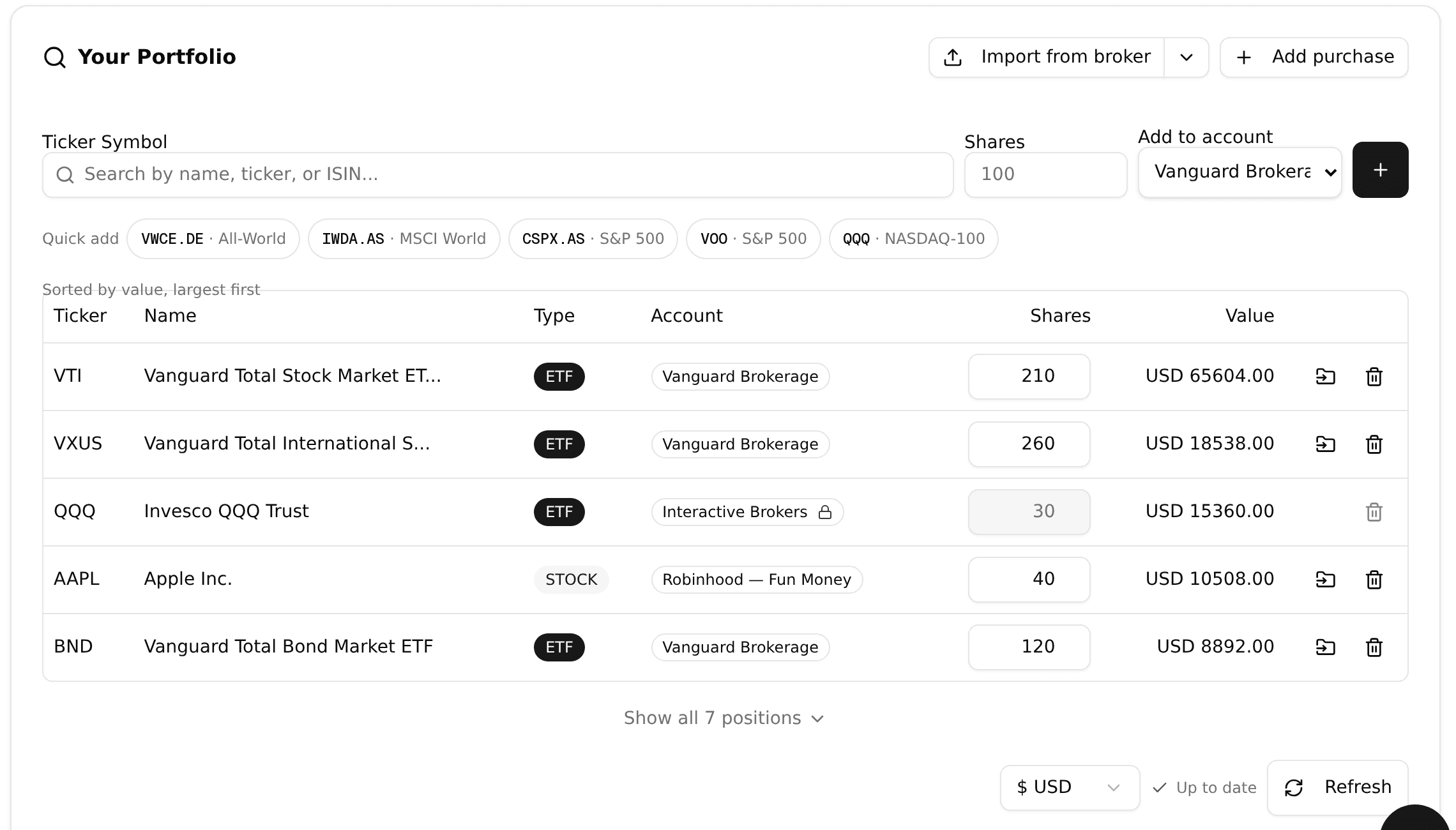
Poke at it without an account in the live demo.
Sold positions can be edited and deleted too. Until this week a sale was final the second you typed it, so one fat-fingered number meant your profit line stayed wrong forever. Each sale is its own row at the foot of the position now, and a row can be fixed.
The button that was hiding
Someone told me they couldn't create a custom spending category. They could. It was sitting behind a flow you'd only find if you already knew it was there, which is a fancy way of saying it didn't exist. There's a Manage categories button on the budgeting page now, right next to Import statement, where a person looking for it would look.
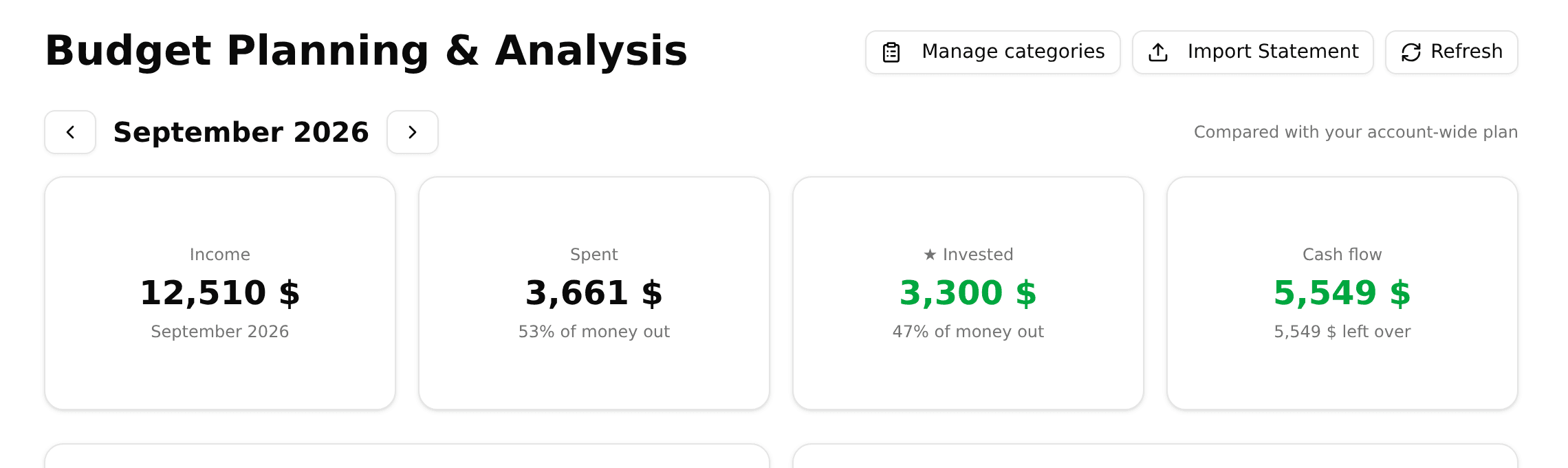
Two smaller ones. Typing a bare ticker like AVEM or TDIV used to get routed through a preferred-venue list I'd typed out by hand, which sent you somewhere else even though the symbol is its own listing; that list is gone. And the portfolio pages got noticeably quicker, mostly by not asking the same question four times at once.
What I'm on next
Dividend tax handling, because the question I get most from people with a dividend portfolio is what they actually keep. Then a rebalancing helper: you tell it the split you want, it tells you what to buy next month, instead of you rebuilding a spreadsheet at eleven at night. Bank connections and the Android app are still on the board, and yes, I've written that sentence before.
The lesson of the week isn't the 94-character name, it's the cash. I let it live in two places for months because I couldn't decide which one was right, and I told myself people would use whichever suited them. They didn't choose. They used both, and their net worth quietly counted the same money twice. A decision I don't make doesn't go away. It gets handed to someone with less information than me.
Now, about those dividends.
Stay updated
Get notified when we publish new articles.
Ready to apply this?
Start tracking your finances today and put these tips into practice.
- Import bank statements in seconds
- AI-powered categorization
- Beautiful visualizations
- Set and track financial goals
Free Financial Tools
Related posts

Your Bank Statement Now Imports While You Do Something Else
I rebuilt the bank statement import from scratch: drop the file and keep working, answer once per merchant instead of once per row, and the app remembers your answers. Plus your partner can now have their own login.
Your Rebalancing Plan Won't Tell You to Sell a 1% Holding Anymore
A reader's rebalancing plan told her to sell a holding she wanted to keep. This week's fixes all started with emails like hers: decimal targets, purchases you can finally see in Profit & taxes, a home that no longer pays you imaginary rent, and overlap badges on the heat map.

Your Dashboard Now Answers One Question: How Am I Doing?
The old dashboard is gone. The new home page sums up your net worth, last month and the road to your goals on one screen, showing only what you actually track. Plus the promised holdings heat map and a categorising prompt that stopped nagging.