You Can Now Ask Your Money a Question
 Dennis Vymer
The AI I put into MFFT this week is not allowed to type a single number.
Not one digit. If it tries, the answer gets thrown away and it has to try again. That sounds like a strange rule for a feature that answers questions about money, so let me explain why I built it that way.
Ask your money
You know the feeling. You want one fact, like "where did my money actually go last month?", and you have to remember which page holds it, open it, pick the month and squint at a chart. The answer exists. It's just four clicks deep.
Now there's a new item in the sidebar called Ask your money. Tap one of the ready-made questions or type your own, and you get one to three plain sentences, a small chart when it helps, and a link to the page where the figure lives, so you can check it yourself.
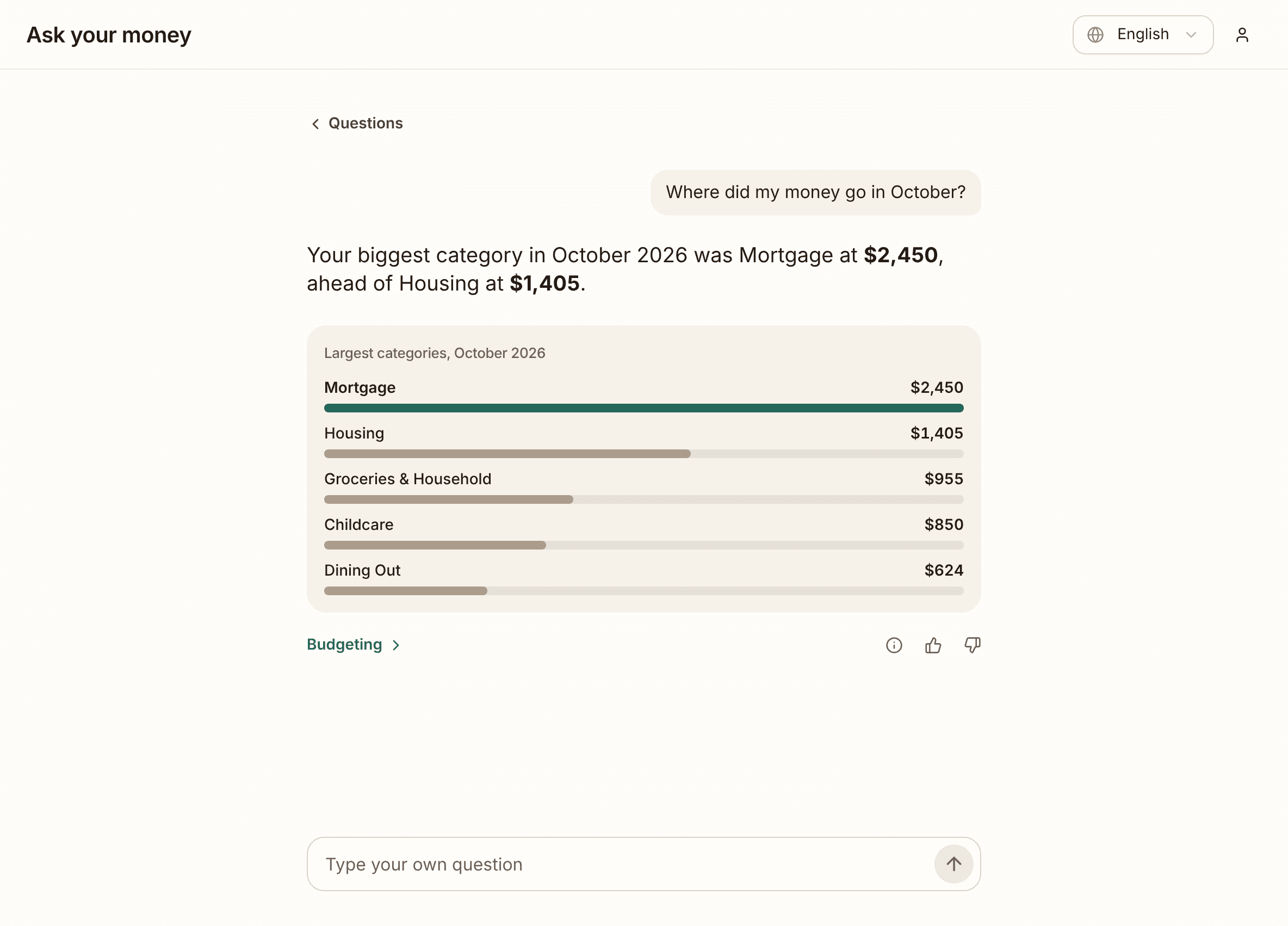
Here's the trick behind it. MFFT works out every figure itself, with the same calculations its own pages use. The AI only writes the words around them, with blanks where the numbers go, and the app fills the blanks in. So the AI can phrase things badly (thumbs down, please, I read those), but it can't invent your net worth.
I've watched other money apps launch chatbots and then apologise for answers that were wrong in obvious ways. In a budgeting app, a confident wrong number is worse than no answer at all. Hence the rule.
It also never gives advice. Ask it whether to sell something and it will politely decline. It's labelled Beta and "answered by AI, not a person" for a reason. You get 30 answered questions a month, and you can delete your past questions any time.
Try it in the demo. No account needed, and in the demo the sentences are prepared in advance, so no AI runs at all.
Every subscription on one page
Budgeting has a new tab: Subscriptions. Press "Find my subscriptions" and MFFT reads up to three months of the payments you've imported, picks out the ones that repeat, and groups them into Streaming, Software, Fitness and Other, with what they cost a month and a year.
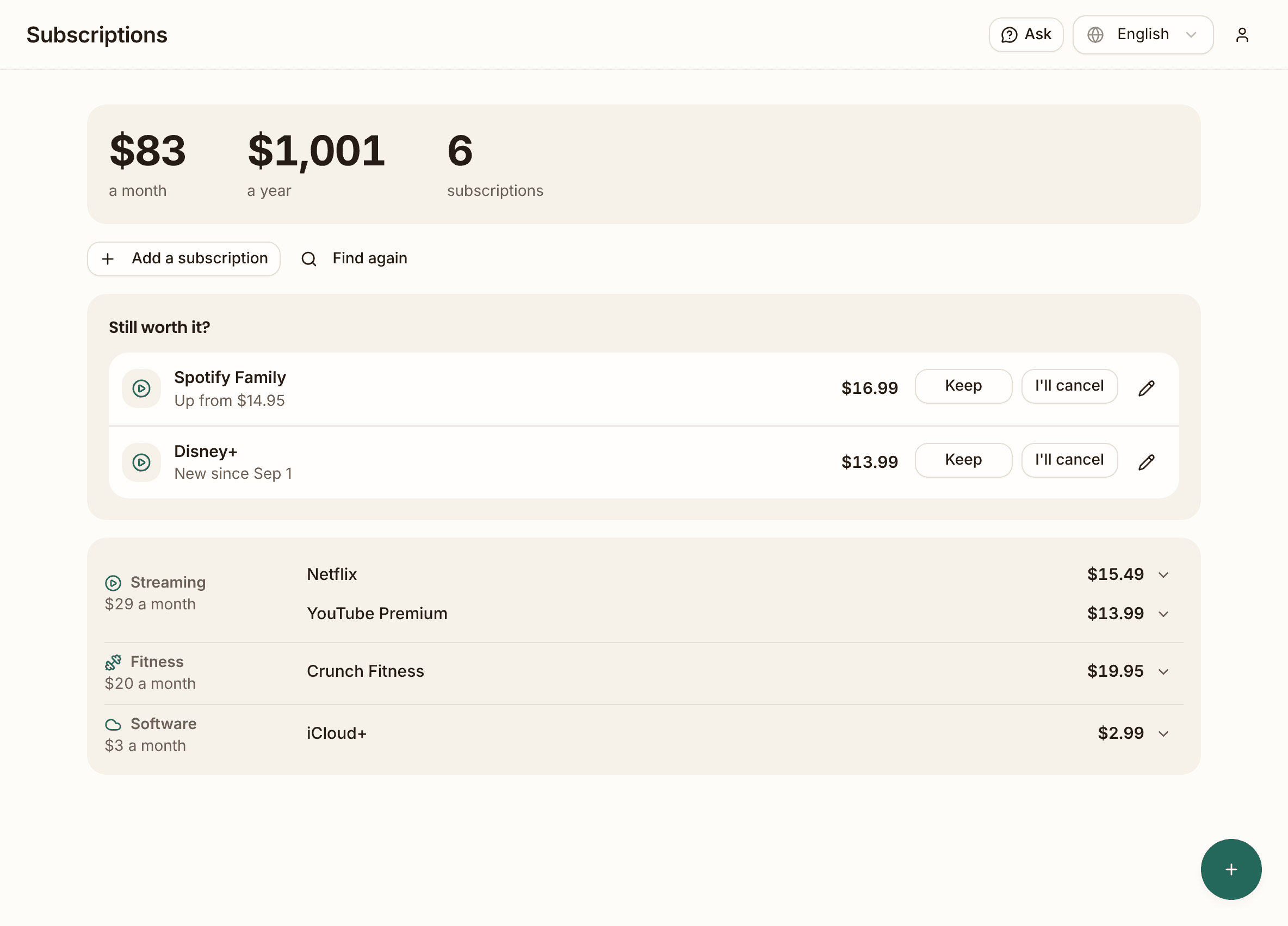
At the top it asks about a few of them: "Still worth it?" The price that quietly went up. The one that's new since September. You answer Keep or I'll cancel. MFFT cancels nothing for you. It just makes sure you look.
Seeing the yearly figure is the part that stings. Fifteen bucks a month feels like nothing. The same thing as a yearly number does not. Got a subscription it missed? "Add a subscription" puts it in by hand.
Goals: money with a name on it
Under Financial Future there's now Goals. Pick a shape (car, holiday, emergency fund, baby, home down payment…), type the amount and an optional year, and it stands on a shelf and fills up as you go.
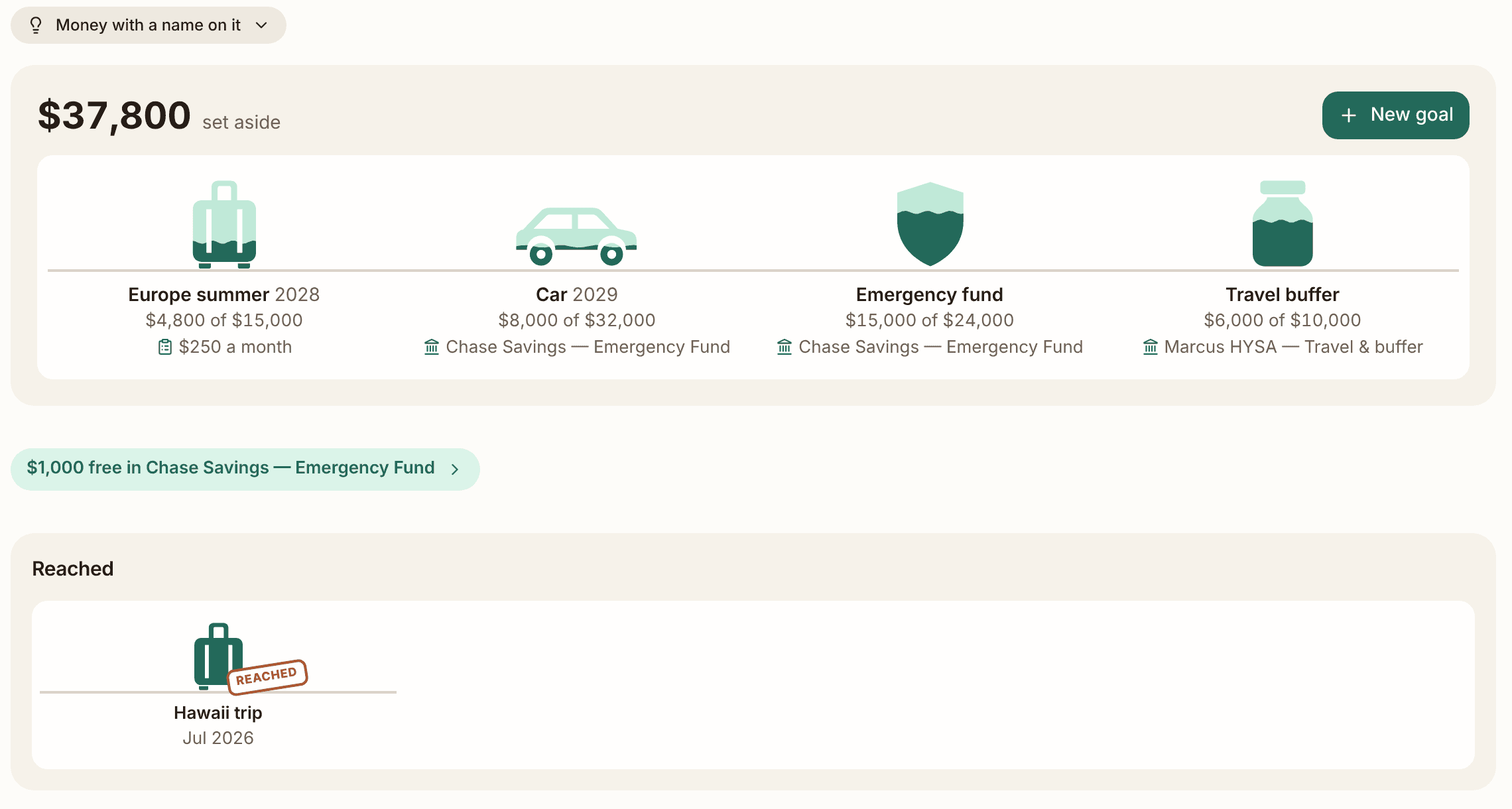
You can tell a goal where its money lives, a savings account, or feed it from a budget line, like $250 a month. When two goals share one account, the page shows what's still free in it. Reach a goal and it gets a REACHED stamp and moves to its own shelf. That stamp is more satisfying than it has any right to be.
One thing on purpose: a goal is a label on money you already have. It doesn't add anything to your net worth, so nothing gets counted twice.
Four fixes that came from your emails
A surprising share of this week came straight from readers writing in:
- Plan a home purchase. A reader who rents today wanted to see what buying in a few years would do to their plan. It used to take four forms and some maths by hand. Now Your Financial Future has one "Buy a home" form that shows the result before you save, mortgage and running costs included. The Rent vs Buy calculator also shows where the money goes: what's gone for good and what stays yours.
- Own part of a property? You can now set your share, and net worth counts only your part.
- Old purchases, right exchange rate. If you bought a US fund in 2022 and entered it this year, the gain used this year's exchange rate. Now every purchase uses the rate from its own day.
- Trading 212 and Degiro files. Last week I said portfolio imports were next. First step: these exports are now read reliably, and a trade that appears in two files counts once.
What's next
A monthly check-in: one screen, once a month, to confirm your balances and goals and see how far you came. Staying logged in for longer, so you don't sign in every visit. And a tax view that shows this year's gains and which purchases you've held long enough.
The lesson
For subscriptions I first built two AI passes: one to find them, and a second to double-check the first. Then I measured it on real accounts. The checker removed 1 row out of 149 and changed nothing else.
So I deleted it. A second opinion that never disagrees is just a slower first opinion.
Go ask your money something this week. I'm curious what you ask first.
Stay updated
Get notified when we publish new articles.
Ready to apply this?
Start tracking your finances today and put these tips into practice.
- Import bank statements in seconds
- AI-powered categorization
- Beautiful visualizations
- Set and track financial goals
Free Financial Tools
Related posts

Your Bank Statement Now Imports While You Do Something Else
I rebuilt the bank statement import from scratch: drop the file and keep working, answer once per merchant instead of once per row, and the app remembers your answers. Plus your partner can now have their own login.
Your Rebalancing Plan Won't Tell You to Sell a 1% Holding Anymore
A reader's rebalancing plan told her to sell a holding she wanted to keep. This week's fixes all started with emails like hers: decimal targets, purchases you can finally see in Profit & taxes, a home that no longer pays you imaginary rent, and overlap badges on the heat map.

Your Dashboard Now Answers One Question: How Am I Doing?
The old dashboard is gone. The new home page sums up your net worth, last month and your goals on one screen, plus the holdings heat map I promised.